


Drive Smarter
4.71.64K Reviews
App Specs
- Version
- 4.9.1.0
- Updated On
- License
- Free
- Downloads
- 100,000+
- Developer
- Cedar Electronics
- Categories
- Maps & Navigation
- Platform
- Android
Screenshots
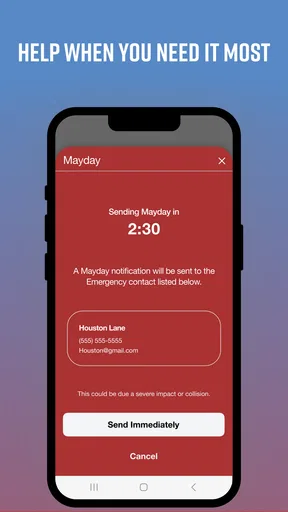
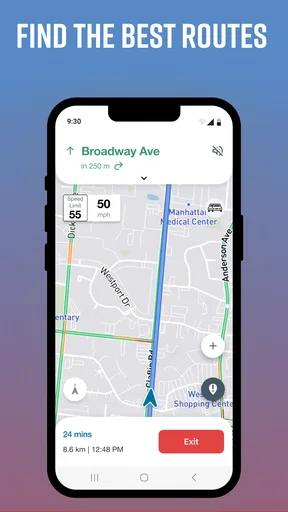
 Analysis by AppCompare
When a dash cam is part of your regular driving routine, the phone app matters most when it helps you make sense of the camera without becoming another distraction. Drive Smarter is a free maps and navigation app from Cedar Electronics, intended to work with select Cobra and Escort dash cams. I see its strongest use as a companion to compatible hardware, rather than a replacement for a general-purpose navigation app.
A practical routine for compatible dash cams
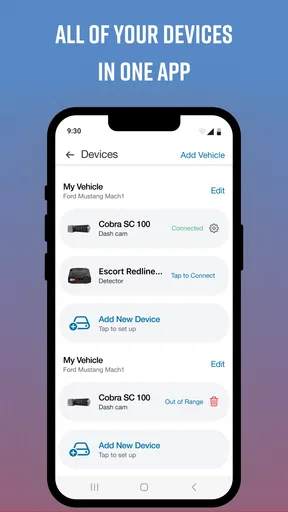
A useful way to approach Drive Smarter is to decide what you want from it before setting off: help with a compatible dash cam, driving-related information, or a quick way to review your setup. Pairing the app with a supported camera is central to its purpose, so I would check that my particular dash cam is compatible before relying on it. If you do not own a supported device, the app is unlikely to be as useful as a navigation app built around maps and route planning.
My preferred routine would be to handle setup while parked, confirm the camera and phone are connected as expected, and then leave the phone alone once the journey begins. That small habit matters: a dash-cam companion should make driving simpler, not encourage tapping through screens in traffic. If something needs attention, pull over safely rather than trying to troubleshoot on the move.
Settings that are worth checking first
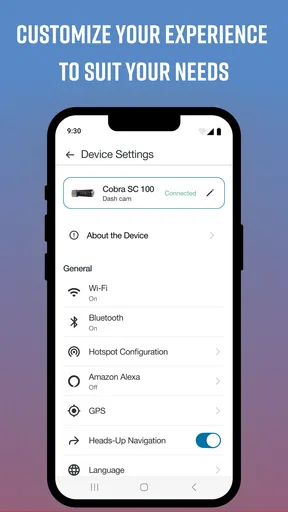
Before making Drive Smarter part of every trip, I would spend a little time checking which alerts are enabled and whether they suit the roads I normally drive. Too many notifications can make useful warnings easier to ignore, while too few may leave the app quieter than I want. I would start with the options that matter most to my routine, then adjust them after a few drives instead of turning everything on at once.
Location access is another practical consideration for a maps and navigation app. I would review the phone’s location settings and choose an option that supports the way I use the app, while keeping in mind that settings can affect how location-based functions behave. It is also sensible to check notification permissions and Bluetooth or device connection settings if a compatible camera is not appearing as expected. These are general troubleshooting steps, not a promise that every connection issue has the same cause.
Small habits that make the app easier to use
A repeatable start-of-drive check can prevent a lot of frustration: open the app before leaving, confirm the compatible camera is recognized, and make sure the alert setup still matches the trip. For a familiar commute, I would keep the routine brief. Before a longer drive, I would allow more time to check the setup while parked, particularly if I have changed phones or adjusted settings since the last journey.
That approach is more useful than treating the app as something to inspect constantly. If I want to act on an alert or change a setting, I would do so before setting off or after stopping somewhere safe. For everyday driving, the best companion app is often the one that fits into a simple routine and then stays out of the driver’s hands.
Worth Reading Before You Choose

EA SPORTS FC Mobile 26 Is a Bigger Football Game, but It Takes Time

Flipboard Shows What News Apps Must Do Beyond the Feed

Switching to Android Auto Means Rethinking Your Driving Routine

Google Calendar Makes a Crowded Week Easier to Manage

Ludo King Makes the Most of the Minutes Between Plans

Baby Panda World Brings Quick Play to Modern Phones, but Its Game Library Feels Busy
Using Drive Smarter in context
I find it helps to treat Drive Smarter as part of a parked-before-you-drive routine, not as another screen to manage on the road. In the next section, I look at how its dash-cam role differs from ordinary navigation and why that distinction should guide whether it earns a place on your phone.
Where it fits beside regular navigation apps
Google Maps, Apple Maps, and similar navigation apps are usually the more natural choice when I need to find an address, compare routes, or get turn-by-turn directions. Drive Smarter has a different job: it is built around select Cobra and Escort dash cams. That distinction is important. I would use a conventional navigation app for route planning and consider Drive Smarter for the camera-related companion role, rather than expecting one to replace the other.
For a driver who already owns compatible hardware, having a dedicated companion may be more convenient than trying to make a general map app manage camera-related needs. For someone who simply wants traffic-aware directions, though, installing another app without a supported dash cam may add little. The right choice depends less on which app has the broadest feature list and more on whether the driver has the equipment Drive Smarter is designed to accompany.
Everyday situations and sensible trade-offs
Imagine leaving work on an unfamiliar route in the evening. I would set up the phone and camera before pulling away, keep the screen use to a minimum, and rely on the app only for the parts of the drive it is meant to support. If a connection or alert did not behave as expected, I would avoid fiddling with it at a traffic light and check again after parking. That is a safer, more realistic workflow than assuming any driving app will work perfectly in every location.
There is also a trade-off in adding a companion app to a phone: another app needs to be configured and maintained, and its usefulness depends on the compatible camera setup. Drivers who switch vehicles often, use different phones, or prefer a single navigation app may find that extra step inconvenient. I would keep the arrangement only if the camera connection and the app’s role genuinely make my regular driving easier.
Who is likely to get the most from it
Drive Smarter makes the most sense for people who own a select Cobra or Escort dash cam and want a phone companion for that equipment. It is also a better fit for drivers willing to spend a few minutes establishing a consistent setup instead of expecting the app to be useful without any configuration. If your needs are mainly ordinary directions and destination search, a familiar mapping app is probably the more direct option.
I would also think about whether phone interaction suits my driving habits. A driver who wants everything configured once and then left alone may appreciate a simple pre-trip check. Someone who expects to browse maps, change settings, and respond to frequent prompts while driving should rethink that approach: no companion app is worth taking attention from the road.
Limits, access, and ownership
The app is free to download and is rated for Everyone, but it includes in-app purchases priced from $4.99 to $49.99 per item. I would check the purchase details in the app before buying anything, and avoid assuming that every function requires a purchase or that every purchase suits every driver. The rating and price do not change the main practical question: whether you have a compatible camera and a reason to use its companion app.
It has an average rating of 4.6 from around 11,000 ratings, with roughly 1,500 written reviews and over 100,000 installs. Those figures suggest that other drivers have tried it, but they cannot tell me whether it will work smoothly with my specific phone, camera, or route. I would treat them as context, not a substitute for checking compatibility and testing the setup while parked.
The app was released on August 11, 2020, and its current version is 4.7.0.0, with Android 9 as the minimum operating-system requirement. If I were installing it on an older phone, I would check the device’s Android version first. A driver using iOS should check the relevant app-store compatibility details for their device before setting up a camera connection.
What I would check before committing to a routine
Three questions can help decide whether Drive Smarter belongs in my regular setup. First, is my Cobra or Escort dash cam among the supported models? Second, do I want a dedicated camera companion, or do I only need navigation? Third, can I complete setup and make any changes while parked rather than relying on phone interaction during a drive? If the answers point toward a compatible camera and a clear use, the app has a more convincing role.
If the camera is not supported, I would skip the download rather than expect Drive Smarter to replace the maps app I already use. If I am unsure about a connection, I would check the device settings and app permissions while stationary, then test again on a short, familiar trip. That cautious first run gives me a chance to learn the workflow without depending on it during an important journey.
My verdict after weighing the fit
Drive Smarter is best judged as a companion for select dash cams, not as an all-purpose answer to every driving need. Its value depends on compatible equipment, sensible setup, and a driver who wants a dedicated app in the mix. I like the idea of building a calm, repeatable routine around it, but I would not recommend it to someone who has no supported camera or only wants straightforward directions.
For a compatible Cobra or Escort owner, I would give it a fair try, configure it before driving, and keep expectations tied to the role it is meant to play. For everyone else, a conventional navigation app is likely to be simpler. That is the clearest way to decide: choose Drive Smarter when its dash-cam connection solves a real need, and leave it aside when it would just add another screen to manage.
Ever find yourself wishing you could have a personal assistant riding shotgun, helping you navigate life's daily driving challenges? Well, Drive Smarter might just be the app to make those wishes come true. I took it for a spin and here's what I discovered.
The Basics
First things first, Drive Smarter is designed to be your ultimate driving companion. It's available on both Android and iOS, which means nearly anyone with a smartphone can join in on the fun. The app aims to enhance your driving experience by offering real-time updates and alerts on traffic, road conditions, and other crucial driving insights.
Getting Started
Setting up Drive Smarter was a breeze. After downloading, the app guides you through a quick setup process. You’ll need to give it access to your location, which is totally expected for an app of this nature. Once you're in, the app's interface is clean and intuitive, making it easy to find your way around.
Features Galore
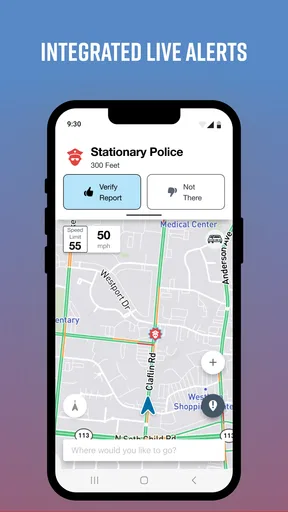
So, what does Drive Smarter offer? Quite a lot, actually. One of my favorite features is the real-time traffic updates. The app integrates seamlessly with your GPS, providing up-to-date information on traffic jams, road closures, and even accidents. It's like having a little traffic cop in your pocket.
Another neat feature is the driver score. The app tracks your driving habits—things like speed, braking, and cornering—and gives you a score. It’s like having a fitness tracker, but for your car. You can even challenge yourself to improve your score, making every trip a bit of a personal competition.
Safety First
One aspect where Drive Smarter really shines is safety. The app offers alerts on speed limits and potential hazards on the road. There’s even a feature that warns you of nearby speed traps and red-light cameras. It’s an extra set of eyes that help you stay focused and safe.
And for those of us who tend to forget where we parked, the "Find My Car" feature is a lifesaver. Just tap a button, and the app will guide you back to your ride. No more wandering around the parking lot like a lost puppy.
Connectivity and Community
What really sets Drive Smarter apart is its community-driven features. Users can report road conditions, speed traps, and other hazards. It's like being part of a massive team of drivers, all looking out for each other. Plus, the app allows integration with various smart devices, making it a hub for all your driving needs.
Room for Improvement
Of course, no app is perfect. While Drive Smarter offers a ton of great features, there were times when the app lagged, especially in areas with poor connectivity. Also, if you're not careful with the app settings, the notifications can get a bit overwhelming. But hey, that's a small price to pay for staying informed on the road.
Final Thoughts
In the end, Drive Smarter is a fantastic tool for anyone who spends a good chunk of their time behind the wheel. It’s more than just an app—it's like having a co-pilot who’s always got your back. Whether you're a daily commuter or just someone who loves a good road trip, this app is definitely worth checking out.
So, if you're looking to make your driving experience a little smoother, a little safer, and a whole lot smarter, give Drive Smarter a try. You might just find it becomes your new favorite travel buddy.
Pros
- User-friendly interface for quick navigation.
- Real-time traffic updates enhance safety.
- Customizable alerts for driving habits.
- Integration with smart devices is seamless.
- Comprehensive trip history and analytics.
Cons
- Requires stable internet for best functionality.
- Limited features in the free version.
- Some alerts can feel intrusive.
- Battery consumption may be high.
- Occasional syncing issues with devices.
FAQs for Drive Smarter
What is Drive Smarter and what features does it offer?
Drive Smarter is an innovative app designed to enhance your driving experience by providing real-time alerts, traffic updates, and navigation assistance. It also offers features like trip logging, fuel efficiency tracking, and integration with smart devices. These tools aim to improve safety, convenience, and fuel management while on the road.
Is Drive Smarter compatible with both Android and iOS devices?
Yes, Drive Smarter is available on both Android and iOS platforms. The app is designed to work seamlessly across various devices, ensuring a consistent user experience. Users can download it from Google Play Store for Android and the App Store for iOS, making it widely accessible for all smartphone users.
How does the app enhance driving safety?
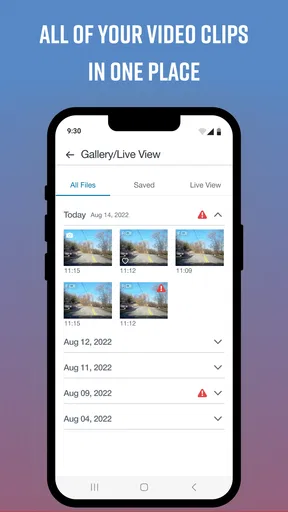
Drive Smarter enhances safety by providing real-time alerts about road conditions, traffic congestion, and potential hazards. It integrates with smart devices like dash cams to offer live video feeds and incident detection. These features help drivers stay informed and make safer decisions on the road, reducing the risk of accidents.
Does Drive Smarter require a subscription or in-app purchases?
Drive Smarter offers a free version with basic functionalities. However, for advanced features such as premium navigation tools, enhanced traffic updates, and integration with additional smart devices, users may need to subscribe to a premium plan or make in-app purchases. Details are available within the app.
Can Drive Smarter be used without an internet connection?
While some basic features of Drive Smarter may work offline, such as previously downloaded maps, most functionalities require an internet connection. Real-time updates, traffic alerts, and integration with smart devices depend on a stable internet connection to provide accurate and up-to-date information.


